
Storing Sleep Quality now with 100 scale
Starting from now on we are storing the sleep quality with a 100% scale. Previous entries will be converted. On the API the quality has two fields (quality (old 10 scale) and quality_100)
Extended Fitlogimport (Equipment)
We added the support of importing the equipment within fitlog files. If a name matches it will be used otherwise an equipment will be created. We added the support of additional data series
Support of the new Polar Json file format
When you request a backup at Polar you will get Json files for your activity files. The format has changed, but is supported now
Changed Sport detection for Fit files
By default, we look at the main sport/sub-sport in the Fitfile. If a “manual sport name” is stored in the file, we check whether the user has a sport with EXACTLY the same name. If not, the recognized sport from the main sport/sub-sport continues to be used.
Missing Strava Sport Types
On the historical import tool several Strava Sport Types were missing. Result was that some users could not requesting all sport types from Strava.
Automatic Synchronization with Zwift
You can now synchronize activties from Zwift to Runalyze directly
Correct redirect after social login (Google/Facebook)
When connecting an external app to our API authorizing via Google/Facebook didn't worked as the redirect didn't worked anymore. This should be fixed now
Automatic Synchronization with Rouvy
You can now synchronize activities from Rouvy directly
Improved Suunto Sleep/HRV synchronization
As Suuntos API supports now webhooks to inform us directly about new sleep/hrv entries we can now sync those information more reliable and faster.
Garmin:
In order for us to retrieve historical data (history import tool), you must activate the toggle at Garmin (also for existing connections) (https://connect.garmin.com/modern/settings/accountInformation).
Infrastructure updates for faster scaling to handle peak loads/user growth
We are working on improving Runalyze's scalability to cope with server load. At the same time, we are working on improving early detection of synchronization problems and other errors.
Too long cached heatmaps
The personal heatmap was cached too long. The user got a too old version
Internal upgrades
Infrastructure upgrades + Runalyze Core Upgrades
Sync with Hammerhead
SportTracks *.logbook files: Import Heart Rate and GPS track
SportTracks *.logbook files are quite old. Still, we finally made it and are able to parse the decoded gps track and heart rate data.
Import of duplicates: Append trackdata if none exists so far
Duplicates are detected and ignored during import. From now on, duplicate uploads/syncs automatically append their trackdata (e.g. gps track, heart rate/pace/... series) if the existing activity has none.
Performance curves/Best distance segments: Include activities without trackdata
Due to technical limitations, performance curves and best distance segments did not include activities without trackdata. That has been fixed. The tools do now assume a constant pace/power/heart rate and include those activities.
Progression graph: Option to show pace bunny (from goals panel)
Fix pace zones in pace plots for other sports than running
FIT files: import 'Impact Load Factor' and 'Step Speed Loss'
New metrics 'Impact Load Factor' and 'Step Speed Loss' are now imported from FIT files and shown if available. Those metrics require a new Garmin HRM 600 to be available.
Increased Rate Limits for Personal API Usage
We have increased the hourly requests allowed for Supporters (20-> 40 requests) & Premium (100->150 requests) to the Personal API. We might increase it even more in the future.
New view for all climbs
With Runalyze’s own Climb Score and the categorization of climbs into 5th/4th/3rd/2nd/1st category and HC (Hors Catégorie), Runalyze brings a touch of Tour de France feeling to running and cycling. With the latest update, a new view provides an overview of all “climbs” completed so far. Read more
Adidas has discontinued their API
As of today (06/30/2025), the integration of Runtastic/Adidas Running has ended, as Adidas has discontinued the API. No further sync will be possible
API: New endpoint for race results
API: New endpoints for activity export (original fit file, gpx, kml, tcx, fitlog)
Refactored API (05/16/2025)
After frequently putting you off with statements such as “In progress” and “Coming soon”, the time has finally come. Runalyze has a new API! The API for third-party apps (Third Party API) and for personal use (Personal API) has been completely renewed. Read more
New formula for Monotony
The formula for calculating the training monotony has been slightly adapted. The original formula is very sensitive to high monotony. This problem should be avoided by making a slight adjustment. Read more
New feature: Recurring Routes
Runalyze now compares all your routes with each other and groups them together if the routes match. For more details, see https://blog.runalyze.com/allgemein-en/new-feature-recurring-routes/.
Withings Sleep Synchronization: Added resting/average heart rate
New feature: Eddington Number
Are you ready for the first new Runalyze feature in 2025? It's the Eddington number.
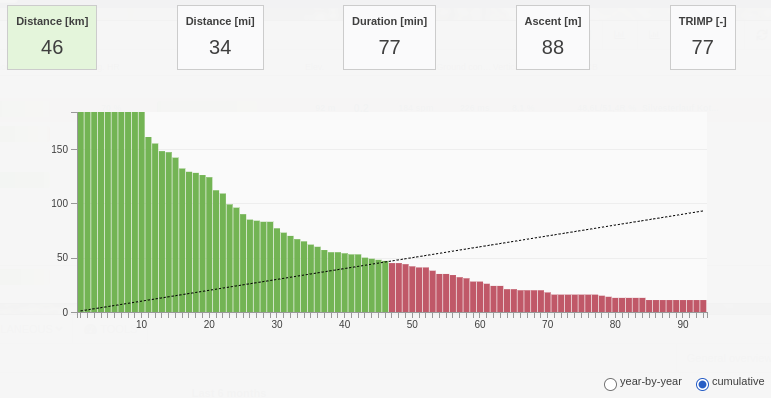
The Eddington number is mostly known amongs cyclists and is defined as the maximum number E such that the cyclist has cycled at least E miles on at least E days. Of course, it can be defined for running and other metrics as well. Runalyze can now show you the Eddington number for every sport for Distance [km], Distance [mi], Duration [min], Ascent [m] and TRIMP. It's shown together with a handy graph to see what's missing for a higher Eddington number and a table to see a year-by-year or cumulative wrap-up. For non-Premium users, the time period of the viewed activities is limited (to current and previous year).
Upgraded backend core of Runalyze
Added "by days" to monthly statistics
Added new searchbar
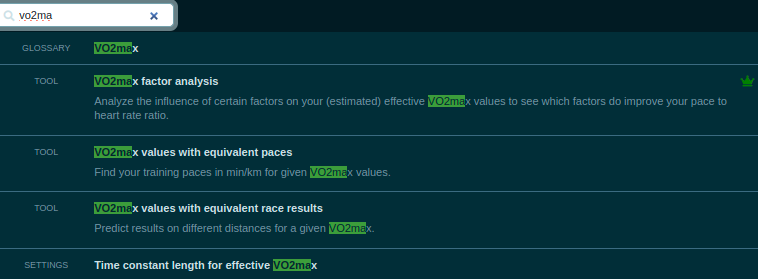
We added a Search bar to Runalyze - You can use it to find tools, settings, glossary articles and help articles (English titles) much more quickly.
Two-factor authentication
You can now activate the two-factor authentication at https://runalyze.com/settings/account
Histogram tool: Allow multiple sports when showing zones
You can now select multiple sports when showing zones in the histograms tool. If sports with differently configured zones are selected, the zone limits are ignored. Zones are then grouped together according to their respective index.
Polar automatic backfill of recharge daily data
As Polar data can be delayed for too long we now introduced a automatic backfill of the HRV/avg. Hr/respiration rate. This behaviour will be triggered when you go online at Runalyze (maximum once a day and only for the last 28 days).
Under certain conditions, captchas are now required during registration
Strava sync failed
Since Strava now uses http2, there was an error when checking the rate limit from the Strava API
Dashboard was infinitely loading after saving a workout
Max. upload size was temporarily limited to 2MB. Back to 250MB now
Sync Fitbit HRV
Test phase. Data is getting synced shortly after sleep data comes in
Upgrade of Runalyze & Infrastructure
We upgraded the Runalyze "Core" to new versions of all dependencies and did some changes to the internal infrastructure
Added "Gravel cycling" as internal sport
Every sport named Gravel and which didn't had any internal sport mapping yet was adjusted to the internal sport "Gravel Cycling" now. For users who had a sport named Gravelbike/cycling which had already a internal mapped sport we didn't changed anything. This can result in a newly created sport for Gravel Cycling when new activities with "Gravel" coming in. If this is the case: Change the new activities to your already existing sport and delete the - because of the automatic created sport during import - created sport type. Then change the existing one and adjust the internal sport to "Gravel cycling" at https://runalyze.com/settings/sport
See also: Forum
Fix parsing of new order within fit files (multi sport)
New tool: VO2max factor analysis
Effective VO2max is perhaps the most exciting metric within Runalyze. Not only because the Effective VO2max is one of the most important parameters about an athlete’s performance, but also because the estimation of it is prone to error and therefore often subject to debate. If the training sessions take place at 30°C with a headwind, sober and with heavy legs, it is difficult to use this as a reliable basis. But which factors have what influence on the ratio of pace to heart rate and therefore on the estimated effective VO2max? Our new factor analysis attempts to find answers to this question.
Use HRV data from Garmin Apps in Health section
When the activity-sport type is detected as "HRV recording" and there is a session field like rmssd it will be added to the Health HRV table. If the sport is not detected correctly and switched afterwards the hrv entry will be created too. The "HRV recording" is an own sport type (Others) - see Sport settings
Use normal range for hrv status indicator in panel
Activity type will be set automatically to Race if race suggestion is accepted
Parse "total_cycles" from fit files as total_strokes
Historical reparsing of all activities will happen at some point
Store "sweat loss" from fit activities
Storing the sweat loss information from fit activities. Historical reparsing of activities will happen at some point.
Sync Suunto Sleep HRV/avg, HR
Fix duplicate when parsing of garmin swim (correct handling of garmin swim with hr)
API: Add endpoint for body temperature
Wahoo history import
Wahoo history import tool is now live https://runalyze.com/tool/wahoo-import
API: HRV endpoint (metric & measurement types)
We updated the HRV endpoint to support other HRV units than only the rmssd. See docs at https://runalyze.com/doc/api
Race database: Added historical parkrun events
Tablesorter for planned races
Fix misaligned columns in calendar view
Garmin: Sync Garmin Snapshot (HRV only) historically
Analysis tab: Option to show last 12 weeks
We've added the option to show the last 12 weeks in the analysis tab (for zone and type distribution) as requested on our ideas platform. For viewing any time period, please use the histograms tool.
Trend analysis does now show only options that have any data
The 'Value to look at' does not show any options for which you don't have any data in your account anymore.
Option to directly reimport activity (fit files only)
Fit files: fix lap data for new Garmin update
Garmin devices with a fairly new firmware may have caused strange lap data due to a recent change in the FIT file format. This has been fixed now.
Best sub segments and lap details for (pool) swimming activities
Coros Health sync was stuck for some accounts
CSV download links on data export for some data
Added download links to Data export for data which is directly available without collecting them in the background.
Chosen Map layer is not stored on personal heatmap/for premium layers
Streak overview: shortest/longest distance in streak
Temperature dew point and cloud cover
Fix disconnects from Coros App -> Runalyze API
Synchronization of sleep data by Suunto
From now on we synchronize the sleep data from Suunto. Unfortunately, the resting and average heart rate is not available for the sleep data.
Synchronization does not take place directly, but is forced by the synchronization of activities or being "active" in Runalyze.
Show target weight in weight plots
Best sub segments for activity: a few more distances / durations
Major update of internal dependencies
New mobile-friendly main navigation
You can now switch to a new main navigation that is especially mobile friendly.
Sports panel: Option for last 7/30/365 days
Fitbit - Continuously Sleep sync
Previously, a Fitbit sleep entry was synchronized once and not continuously.
New: Research projects
Runalyze will henceforth offer scientists the opportunity to use data from Runalyze users for research projects with their consent. Our first pilot project for this is a running style study with and about the LAUFMAUS.
Users can read through the details of the studies and then explicitly agree to the terms of participation, thus making their own training data available to science. In the process, it is clearly listed each time which data is (allowed to be) used.
The data are only provided to the study in anonymized form. The evaluators have no reference to accounts within Runalyze. Also no location references (GPS) data are used. Only the country will/could be provided depending on the study.
At the moment we don't take any request for more studies as this "module" will be extended during the Pilot project
Races: add official ascent/descent and km-effort
Activity view: plot for air power (by Stryd)
Races: support races by duration for personal best and prediction
Coros HRV Sync
Switched to self hosted reverse geocoding
Since it is always important to us to keep all data with us and to use as few external APIs as possible, the place names are now filled in via a self-hosted tool. This currently supports only a reduced language set (English, German, French and locale names) You may notice small differences to the previous one.
Activities list: Add summary mode for intensity distribution fields
Summary lines in calendar view (and statistics) can now show the total intensity distribution (for heart rate, pace and power).
Whoop sync: Option to force synchronisation of single entries
For users with active Whoop connection, Runalyze offers now a list with sleep and recovery entries for last 30 days to force synchronisation of single entries that might have failed.
Prognosis model based on age grade
Coros History Import
Coros History Import wasn't working for a longer time. This is fixed now. You can request the history import for Coros again.
New internal sport: Cyclocross
Marathon shape view: trendline
The marathon shape view does now include a trendline.
Health views: Csv export
Single tables for health metrics now have a link to export the data as csv file.
Activity import: Select sport if an existing activity type name is given as name or description
Planned races showed wrong distance
Units were incorrectly converted to kilometers. The error has been corrected. It was just a visual error.
Stamen maps for payed users
Stamen maps are from now on only available for payed users as we have now to pay for providing these ones. In this process, the map "Stadia Outdoors" has been added.
"Old" Stamen maps will be removed when they are not available anymore.
Syncing activity deletions from Strava
If you delete an activity on Strava that activity deletion will be synced to Runalyze too. You can disable this behavior at https://runalyze.com/connect/strava/settings
(Beta) Push Notifications
We enabled the push notifications on Runalyze. You can "subscribe" at https://runalyze.com/settings/account to it. This won't work yet for everyone/every browser. We are aware of some issues on subscribing to those push notifications. We are monitoring it.
Coros: Some users were unable to connect to the Coros API
It seems like we found the reason. It never affected all users, which is strange.
[Premium] Best segments for power / heart rate
The Best segments tool does now support power and heart rate as new metrics. The default Best distance segments are pace-related and based on fixed distances. Best segments for power and heart rate are based on fixed durations.
Moving average mileage tool: Option to choose scale for values (total sum or avg. per day/week/month/year)
Export: Fix time zones
Fixing error on entering FTP (pace/power)
Plan/Enter future race details (Single/Multi sport events)
You find this at the Race result tab.
Race result details (priority, status)
You can enter the priority of the race (A: Season highlight, B: Important race, C: Preparation race, D: Fun Event) and the status (Finished/Did not finished)
Fix creating new equipment (invalid time)
[Premium] Tiles counter: Grid added
New metric: max. Heart rate drop as recovery metric
We've introduced a new metric that will be calculated for all upcoming activities (with heart rate data): The heart rate drop describes how fast your heart rate drops after high intensity. The idea behind this is that a faster drop means better recovery. This drop is determined within an activity as the largest drop within 60 seconds.
Marathon shape for other distances
With 100 up-votes it was one of the most requested features, now we followed your request and implemented it: The marathon shape is now also available for other distances. Read more in our blog.
Fix for accessing Personal Route Map from IPv6 only providers
[Premium] Personal Route Map
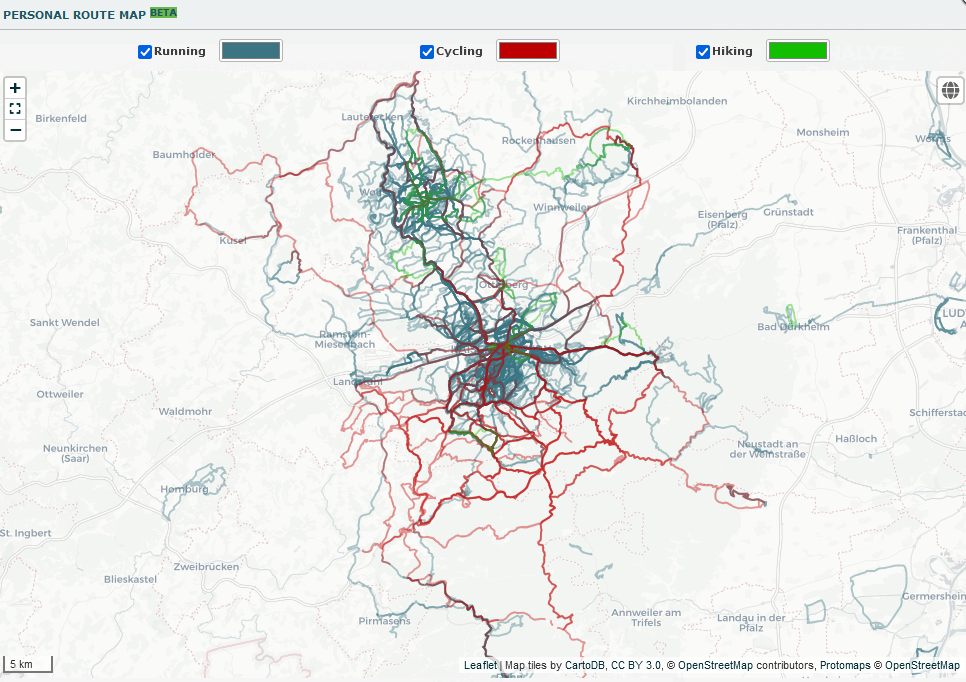
The (Personal) Route Map (available for (early) Premium users) shows all your existing routes on one map. In the activity view, the Route Map of the respective sport can be added as an overlay too.
Fix ordering and distance for equipment with previous distance
Minor fix for translations
Historical Garmin HRV Sync
Historical Garmin HRV sync is available in the history import
Activity view: Lines for Aerobic Efficiency, Efficiency Index and Running Effectiveness in pace/power plots
The pace plot has a new legend entry for Aerobic Efficiency (by pace) that can be clicked to show the respective line. The power plot has a new legend entries for Aerobic Efficiency (by power), Efficiency Index and Running Effectiveness that can be clicked to show the respective line.

Statistics tab: Option to show all custom date ranges
New config option: Show zones in plots (heart rate, pace, power)
The Activity view section has a new option to highlight your configured zones in the heart rate, pace and power plot.

Statistics tab: Summary for (relative) custom date ranges
The Statistics tab will now show for 'Last 6/12 months' or the current year also summaries for all (relative) custom date ranges (not longer than 6 months).
Fix activity trim for non UTC+1 users
Activity view: DFA-a1 values added to hrv section
DFA-alpha1 values and results from aerobic threshold estimation are now directly visible in the activiy view's hrv section.
New sport type: Breathing
You can now add a new sport type 'Breathing' (which will automatically map to Garmins breathing sport type).
Updates to our (automatic) translation
As you may have noticed, we use automatic translations in some places. Especially in languages that are not fully translated, you will notice this more clearly.
Now, automatic translations also take into account a glossary, which translates certain terms correctly. (To our translators: Contact [email protected] if you notice that certain terms in the automatic translations (e.g. in help articles) are not correct, so that we can add them to the glossary.
New settings: Custom date ranges
You can now define your own custom date ranges with a specific start/end date or relative to now as the last X days/weeks/months/years. The defined date ranges are available as direct selection for various tools (but not for all statistics, as the presentation is limited to a few months or years most of the time).
Poster tool now shows preview of selected posters and colors
ANOVA/Trend analysis: Efficiency Index added
New sport types: (E-)Mountainbike
Automatic creation of new sport type when importing fixed for sub sports
Equipment table: date picker
You can now view equipment statistics for any specified date range.
New metric: relative power
Power in [W/kg] has been added to dataset and ANOVA.
Decathlon Sync was not working correctly
Withings Sync: support for body temperature
The Withings synchronization does now support body temperature. You may need to activate the body temperature sync in the Withings Sync settings at https://runalyze.com/activity/sync.
Apple Weather data: wrong time zone has been fixed
We've requested the weather from Apple with the wrong time zone - this is fixed now. Still, already imported activities with weather source "Apple Weatherkit" for the last few days won't be corrected.
Maps: Fix tile size for retina
New weather sources for historical activities
As Darksky (our current Weather API for historical activities) will be discontinued in end of March we added the replacement Apple Weatherkit and Visualcrossing. For most of the current activities you will get the weather data from Apple Weatherkit, for older ones (< 08/2021) from Visualcrossing.
CP values in Performance Curves
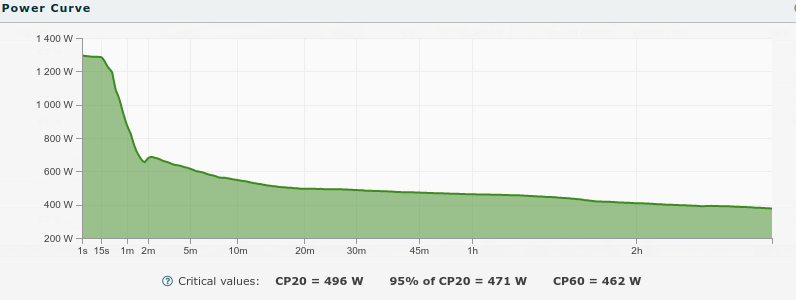
Critical values for power/pace (CP20, CP60) and heart rate (CHR20, CHR60) are now visible in your performance curves.
New tool: Your Year Review
You can now generate not only posters but also some statistics about your sport year.
Expert editing tool: Trim activity
Did you start your activity too early or finish it too late? You can trim all your activity data at the beginning and end accordingly.
[Premium] Weather forecast in data browser
You can see the temperature forecast (and daily details if you click on it). If an activity is recorded for the current day the forecast will be hidden.
Fit files from Suunto: some data series (dev fields) were missing
Suunto does not specify whether those developer fields are for 'record' entries or 'session' entries and we missed to map them to the 'record' entries as well. For activities uploaded after this fix the series will be there.
Polar sync: Forced sync to download fit file
You can now use the force sync/download original fit file for Polar (linked at https://runalyze.com/activity/sync).
Only activities uploaded to Polar in the last 30 days and only activities that have been uploaded to Flow after you connected Polar Flow with Runalyze are shown.
Training partner details
There's a new details view for training partner, similar to what has been added for equipment.
Dropbox Import (for everyone) and Export (at least Runalyze Supporter) available.
Dropbox Import (for everyone) and Export (at least Runalyze Supporter) available. With the Dropbox connection you can on the one hand import activities (and later also health data) and if you are at least a Runalyze Supporter you can export activities automatically and get monthly the different health data exported as CSV.
Since Dropbox unfortunately only allows either complete access to the account (writing/reading) or only to the app folder, we have implemented two connections to Runalyze to reassure those who are a bit "worried" when we could theoretically have access to the complete content. (Dropbox Connections are currently in Beta and will be available for everyone in some weeks)
Read more at: https://runalyze.com/help/article/dropbox
Sync with Whoop
We can now sync your sleep, resting heart rate and HRV value from Whoop. Simply connect your account.
[Premium] Automatically fill route name with all passed cities
Premium users can enable a new feature to automatically fill the route name with all passed cities in their configuration.
[Premium] Streaks view tool
There's a new premium feature for finding and visualizing your streaks.
Concept2 Sync Improvements: Using Fit file for Sync & Force Sync/Download Activity Tool
Concept2 API does now provides FIT files, which we prefer.
Also you have a Sync/Force Tool available for Concept2.
(A history import tool will added later. Switching to automatic notifications for new activity by concept2 will be done next week. (Results in faster sync)
Histograms: Stacked bars can be shown in percent now
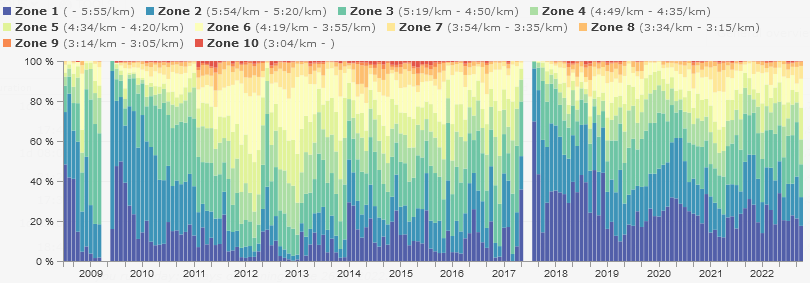
Activity view: map marker with time on x-axis
Marathon shape view: date picker
Health plots: various new plots
There are various new plots in our health section: Blood pressure, blood glucose and body temperature. In addition, tables for a single metric include the plot as well. For weight, the table view can show plots for fat/muscle/bone percentages as well.
Fix overlapping laps (auto + manual) while the activity was paused
Polar sync: Options to enable/disable syncing of activities, sleep hrv
Under Armour sync: Added force sync, history import and finally fixed the general sync
Garmin sync: Blood pressure
We now sync the blood pressure via Garmins API.
New feature: Automatically guessing activity types
For Runalyze Supporter and Premium users there is a new beta feature, which tries to guess the activity type via machine learning based on the already existing "manual" changed activity types. You can activate it in your settings.
If the learned model is "safe" for the particular account, then it sets the activity type.
New config option: Automatically ignore trail runs for vo2max shape
Fixed cache for dfa alpha1 when hrv data series was updated
Force syncing individual activity for Strava
Decathlon connection: Some old connections failed to renew & new connections were not possible in some cases
New public tool: Effective VO2max calculator
The conversion of the Effective VO2max into corresponding race times (and vice versa) as well as the corresponding recommended training paces are now available as a public tool - also for non-users: https://runalyze.com/tools/effective-vo2max
Fit files: Support for overlapping laps (auto + manual)
Runalyze can now correctly import FIT files with overlapping laps, i.e. both automatic and manual laps. This had previously caused problems especially when importing Polar FIT files.
Activity view: fix heart rate unit in heart rate zones
Heart rate values for heart rate zones were always display in bpm and %HRmax even though %HRreserve was chosen. This has been fixed now.
Tag summary panel: new option 'All years'
Dataset: new field 'Title short'
Progression graph: new period 'quarter'
Actvity view: fix moving average calculation in pace plot
Auto-Create sport for new/empty accounts if sport of new activity doesn't exist
Fix incorrect summary on public athlete view
Customized notification settings
Until now, you could only unsubscribe from all mails in general. Now there are various mail types for subscription to better support future features.
If you receive incorrect mails, please notify us.
CSV Parser for old Motorola Actv files
Equipment distribution
See even more statistics in your equipment overview (distribution)
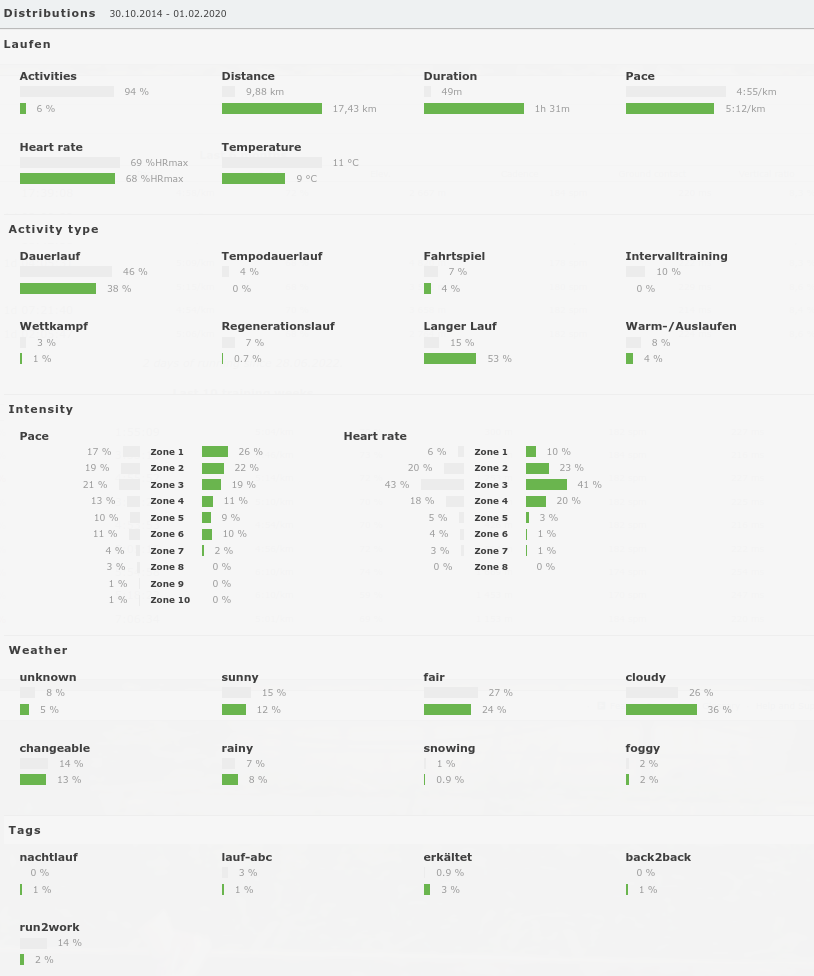
Syncing HRV Summary from Garmin
Syncing nightly HRV average (summary) supported by e.g. by Garmin Forerunner 995
Configuration: major internal refactoring
Selection in plots: range in tooltips
The selection tooltip can now show the range (min/max) in addition to the average.
Tags summary panel: option to show all sports
Wrong Polar Nightly date was synced
Will be correct now for all new sleep/hrv data
Polars API broke - Changed the way getting activities
Polars "old" notification system for new exercises seems to be broken. We switched to the new one now and figured out the missing activities by looking into our logs. Most of the missing activities should be there by now.
You cannot switch the Polar file format anymore. It's now always fit format.
Nightly Recharge data synced from Polar (added to sleep/hrv)
Coros Sync - Added Resting Heart Rate/Sleep Sync
We added the sync of Coros Health data (sleep and resting heart rate data). We will not provide a historical sync for Coros health data at the moment.
Important: The REM/Deep/Light/awake duration is not provided via that API at the moment. We already requested that at Coros.
Default Equipment(s) per Sport
Really often requested: Default Equipment (per Sport) can now be set in the Equipment (Category) settings and is taken into account when automatically importing new activities. Go to https://runalyze.com/my/equipment/overview and edit your equipment categories.
Quality sessions view: added date picker
Equipment: add previous time + Equipment category order function
Fix climb score to respect pauses
New option: Sort equipment by last use
(Configuration -> General Settings -> Activity Form -> Sort: equipment)
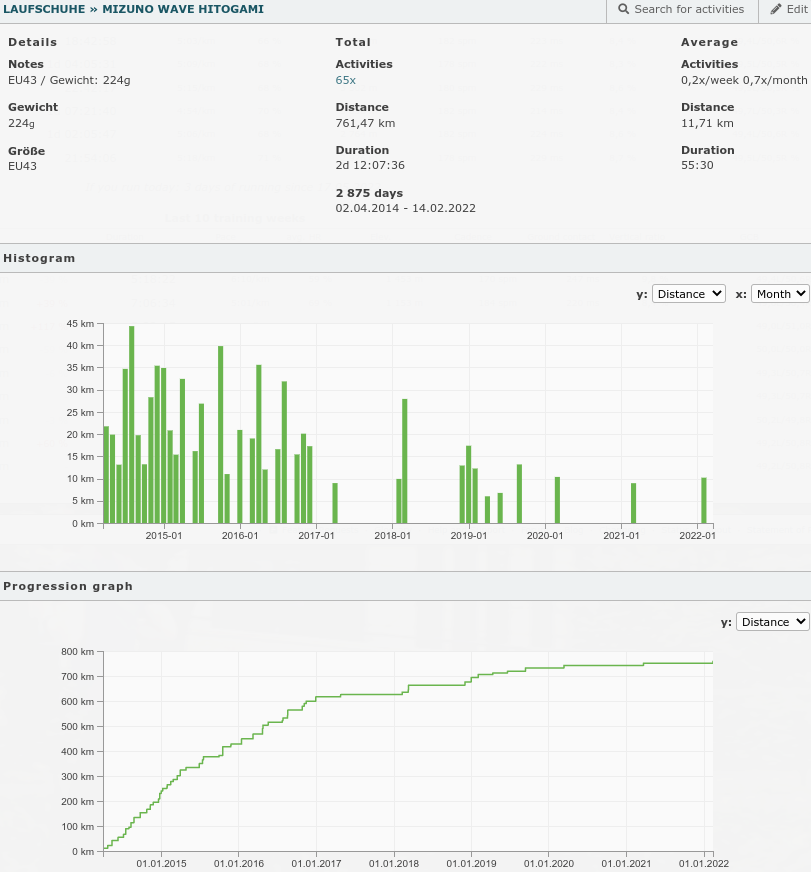
New Equipment details view
If you have activated the equipment panel, then instead of linking to the search, it now links to the new equipment view, which includes a histogram and progression graph, as well as other details.
Garmin Health Snapshot Sync (Fixed wrong timezone)
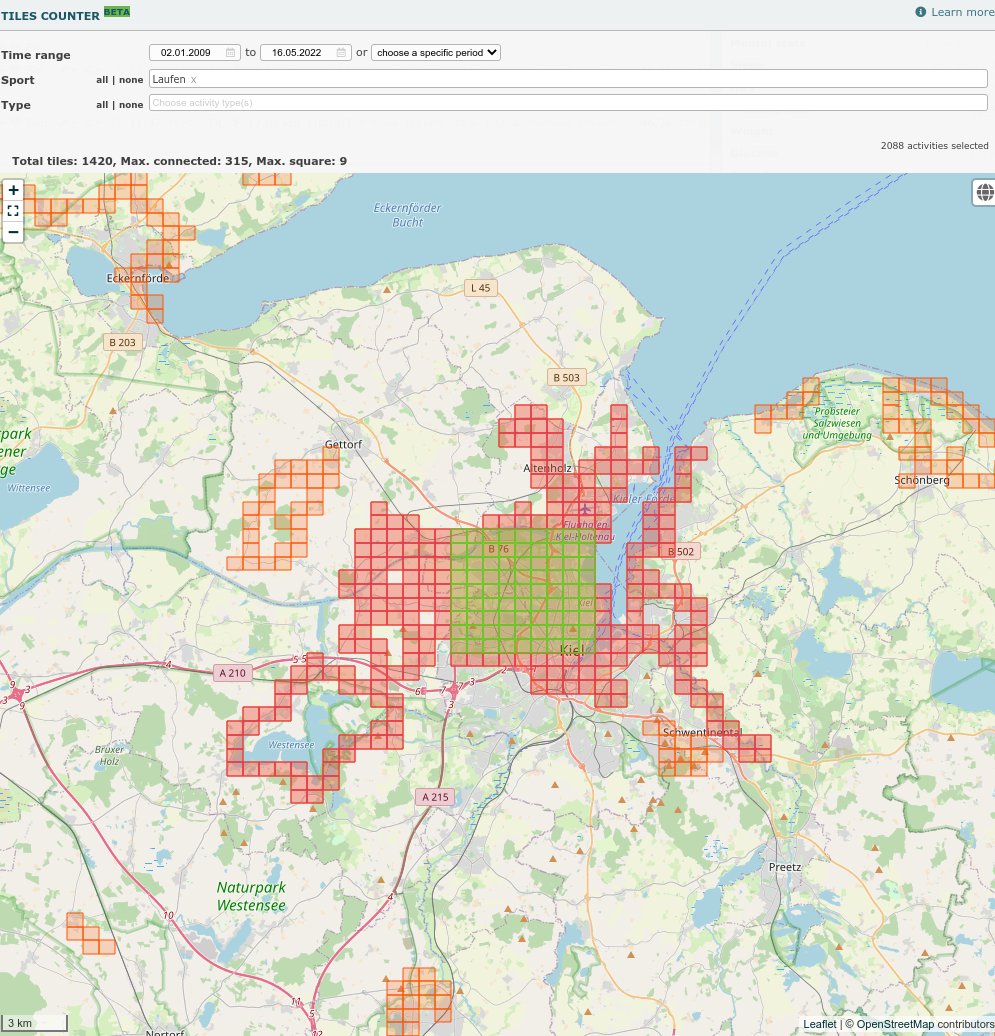
New tool: Tiles Counter (Premium)
Look at where you've been exercising and try to maximize your visited tiles. This is the purpose of our Tiles counter tool.
https://runalyze.com/help/article/tool-tiles-counter
Added Walking as own individual internal sport
You may need to adjust your sport setting if you have a custom "Walking" type
Cadence unit as setting per sport
The cadence unit can now be set individually for each sport.
Mountainbike Grit/Flow data series is now imported for fit files
Mountainbike Grit/Flow data series is now imported for fit files. For historical ones this will be done in a later process.
"Remember me" didn't work anymore for social logins
This has been fixed and after the next "social" login (via Google, Facebook, Apple) it will be active again.
Multiple internal updates
Internal upgrades on the framework & oAuth API Server
Sign in via Apple
Sign in via Apple is possible now
Added a bunch of new (internal) sports + sport icons
We have added today a bunch of new sports (>40) and icons into Runalyze to improve the automatic mapping of the synchronized activities.
Due to the fact that many of these sports have already been created in many accounts via custom sports, we have tried to adapt these created sports accordingly so that it maps to the "internal" sports.
However, due to the different naming and languages, it is not possible for us to do this for all custom sports. Therefore, it may be necessary to do this manually.
For this there is this help article: https://runalyze.com/help/article/adjust-sport-mapping
Health section: Track body temperature
adidas Running History Import (beta)
Added a history import function for adidas Running. Important: As we are not able to do many requests to the API this process can take a bit longer.
New activity value: Peak EPOC estimate
We do now estimate the Peak EPOC for every activity based on your heart rate data.
New expert editing tool: Calculate distance by gps
Removed map layers Wikimedia and HikeBikeMap
The maps were dropped by the provider.
Storing the developer session fields from FIT files
From now on, we also store developer session fields from FIT files, which were not mapped to native fields internally before. The field names coming from the files are sometimes a bit cryptic, so you have the possibility to configure the field names and units for the activity view. For historical activities imported in FIT format after 10/13/2019, the information will also be available in the future. The process for this should start in Feburary and will take a while to process the files again.
Update device list
Updated the device detection list (including some version of the Garmin Fenix 7)
New config option: Prefer ascent/descent from file
All following fit file imports will import the original values for ascent/descent. You can choose to display those values instead of the ones calculated by Runalyze. Still, when looking at segments of a route (e.g. for climb score or when analyzing laps) calculated values will be used/shown.
We show the ascent/descent values in the moment for all files imported since today. For historical activities imported in FIT format after 10/13/2019 these information will be available in the near future too.
CSV export for rr intervals on DFA a1 thresholds view
[Premium] Dataset fields for hrv values
Poster tool: fixed translations on poster
Refactored trend analysis
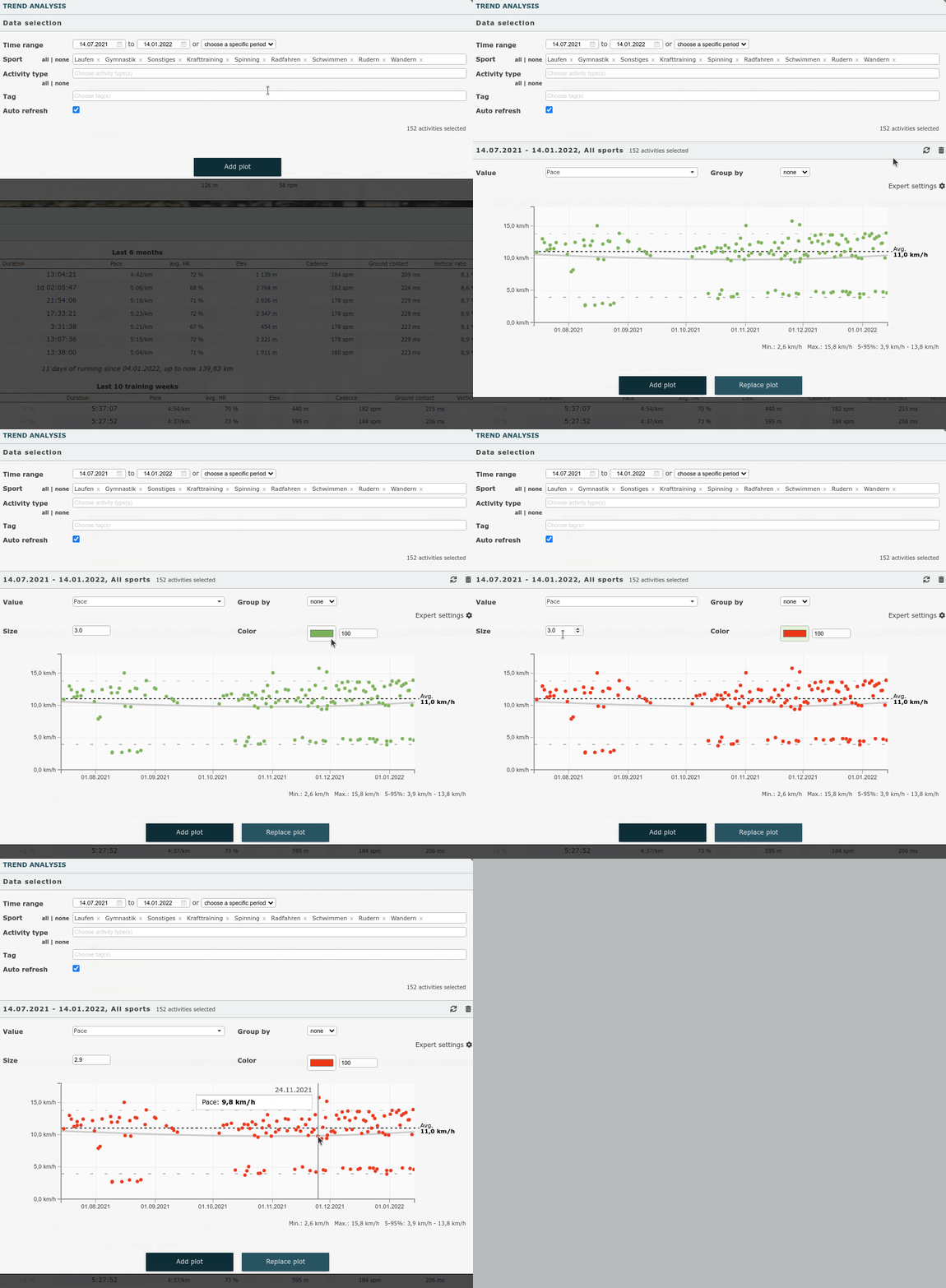
We have slightly modernized and extended the trend analysis tool within Runalyze. The tool can be used to examine trends in the development of individual activity values. For this purpose, the respective value is displayed in the course of time over the different months (and years) as a dot diagram.
This is new:
- Option to group by day / week / month / year
- Possibility to display several diagrams one below the other
- Improved tooltip (incl. link to the activity if you “fix” the tooltip by clicking on it and then click on the date)
- Expert settings to change size/color
- Data is loaded only once, changes can be displayed directly
- Minor optical changes
)
Adidas Running Sync - Allow manual entered activities
It's possible to sync activities without GPS data from Adidas Running now.
Histograms: energy expenditure
Poincaré plot for activity: same limits for x and y axes
Fix issue in plots that display data per week
Marathon shape, progression graph and quality sessions had an issue with displaying all weeks correctly in 2022.
Equipment: additional data fields
You are now able to add custom data fields for your equipment.
Added adidas Running API Synchronization
Quality sessions: Graph did not load in certain cases
Activity view: Map didn't load when distance steps were too big
Update for the fitbit sync
We adjusted/improved the Fitbit Sync and added a force/download option (linked at the service overview page at https://runalyze.com/activity/sync)
HRV Endpoint on API/Personal API
It's now possible to send HRV entries via external apps or own integration (Personal API) to Runalyze
Released Runalyze Early Premium (Qualtiy Sessions, Best segments Moving average milage), Historical HRV Values (Trend Analysis, Anova)
For more than a year now there is the possibility to support us as a “Runalyze Supporter” and thus ensure the further development of Runalyze. To all the supporters out there: You bring us a bit closer to our goal of being able to run Runalyze not only on a part-time basis. Thank you very much!
But as mentioned at that time, there will be another level for additional and especially cost-intensive features. The time has come now and we start with “Runalyze Early Premium“. As a premium user you have the possibility to raise your training analysis to a new level and get the best out of your training.
- New analysis tool: Quality Sessions
- New analysis tool: Best segments
- New analysis tool: Moving average mileage
- Poster tool: Show all years at once and/or use map background for heatmap
- Performance curves for any period (not only last 90 days)
- Progression graph for all years (not only current and last year)
- Historic hrv values in trend analysis and anova
- Colored tracks based on various metrics (not only pace)
- Additional map layers: OpenCycleMap, Outdoors Map
Video export is working again
Fixing Oura Sleep Sync
Duplicates still occured and latest sleep entries were not correctly synced. We change the duplicate detection.
Poster generator: Square layout
Merge trackdata into file: Now based on date/time
We have recently added the option to add trackdata from a new file into an existing activity. As of today, merging is also possible based on the timestamps. Unlike the other methods, different start and end times of the files are correctly taken into account.
Runalyze API - Bugfix for Coros Sync
Pushing activities from Coros APP to our API wasn't possible because of an library issue. The direct sync with our connection to Coros API was operational the whole time.
New Garmin sync option to disable retrospective sync of title/notes
Merge trackdata from uploaded file into existing activity
You can now merge trackdata from an uploaded file into an existing activity. This is useful when recording an activity with different devices, e.g. when using Zwift where Zwift itself records the gps route but your own device (e.g. Garmin/...) records all other data. You can now upload the Zwift file afterwards (via Merge file into activity) and select which data series to copy.
Options to hide specific health sections
The settings have a new section Health where you can hide specific parts of Runalyze Health that you don't track, e.g. blood glucose or blood pressure.
Fix poster generator (for circular, grid and calendar)
A bug introduced with a bigger internal release a few days ago has been fixed.
CSV export of stream data for a single activity
Data series can now be exported as csv file for each activity.
Fix duplicate oura sleep syncs
Fix video export
In some cases the video export was not successful.
Enhanced sport type mapping for gpx files
Sport types in gpx files from Strava and at least running and walking from Amazfit devices will be recognized (as long as the internal sport type is correctly set in your settings.
Pace recommendations: new preset for Pfitzinger
Fix duplicate Coros activity sync
We are getting multiple informations for one activity by Coros. We try to prevent duplicates at an earlier processing point for Coros.
Fix Garmin Health Body Composition
If manual edits are made on our side after syncing data, data may get overwritten if one adding new entries on Garmin for the same day.
Runalyze Health: HRV
Our health section does now support HRV entries. They will be synced automatically from Garmin and Oura or you can enter them by hand.
Device added to search and dataset
Marathon shape view: option to switch to previous date(s)
You can now go back week by week to have a look at your marathon shape for previous dates. Just click the arrow(s) when hovering the date in the header.
Filter by tag in trend analysis and anova
Injury risk in recovery status view
See your recovery status and our glossary.
New supported file format: Polar json files
To get the full history of your polar activities request your Polar data backup
Aerobic threshold estimation based on HRV: Option to specify range
You can now specify a custom range (from ... to ...) which will be used to estimate your aerobic threshold based on DFA-a1 values (based on HRV data).
Original pace and power for concept2
Fitbit: Auto sync for sleep and weight
Sleep and weight are now synced automatically from Fitbit.
Track menstrual cycle (alpha)
Tracking of menstrual cycle details has been added as a first alpha version.
Animated route as video export
Strava title updates sync
Updates on Strava titles are getting now forwarded to already synced activities from Strava.
Internal sport: Stand Up Paddling
Respiration rate for sleep data
Privacy zones (beta)
Privacy zones have been added to Runalyze as beta (still verifying some edge cases), see your privacy settings.
Map layers: minor fixes
Adjusted max zoom for all map layers. OpenMapSurfer and Hydda have been removed. Mapbox has been fixed.
User Backup failed in individual cases
In addition, we've improved the download speed.
Retrospective sync of title/notes of Garmin activities
Title/Notes will be updated if you update these at Garmin Connect. This works for all Garmin activities since May 2021.
Merging HRV CSV file supported from Android Heartrate Monitor
Concept2 sync bugfix
Some connections to Concept2 were affected by a bug that prevented synchronization.
Expert editing tools
We have a new expert editing tool for correcting the distance data series. You can now fix the distance data of your activity in case of gps issues based on a new total distance or piecewise values based on your rounds.
You can find the tool in the drop-down with editing tools located in the header of the full activity view.
Support for unusual FIT files produced by Strava
Garmin history import: Reduced the time range we try to request from Garmin
Fix search by duration
New map layer for activity view: CycleOSM
For all cyclists out there: We have added a new map layer for the activity view: CycleOSM
Histogram tool zones are now based on the recorded data series
The zone statistics (Pace/Power/HR) in the histogram tool are now based on the recorded data series and no longer only based on the average values.
Missing session from multi sport files (synced directly via Garmin, Suunto or Polar)
There was an bug in our duplicate detection which resulted in missing session from multi sport files. This has been fixed now for future activities.
Added route detection of new Zwift world "Makuri Islands"
Refactored data export
The data export failed in some cases because it required too much resources more for "large" accounts. We have improved the way it works.
Merge HRV Logger CSV into activity
You can now merge the csv generated by the HRV Logger app into your activity.
Fix title and description in Strava sync
DFA-alpha1 estimation: Use detrending
We now correctly detrend rr intervals for DFA-alpha1 estimation (as part of the Aerobic Threshold Estimation based on HRV). Bruce Rogers has taken a closer look at the improved variant in his blog and showes another example.
Various fixes after internal refactorings
We changed a lot of internal stuff recently and introduced a few minor bugs when releasing the changes. Those minor bugs (gap was missing in plot, avg. distance per week/month in year-on-year view was missing, ...) have been fixed now.
Fixed Under Armour parser for different stream sizes
Support for new FIT fields for Feeling/RPE
As we have a different RPE scale the values from Garmin will be adjusted to our scale.
Merge Polar HRV file into the activity
We now offer the possibility to merge the Polar HRV-CSV file into the activity. That HRV-CSV file is available in Polar Flow if you have an Polar Vantage 2 or record activities with the H10 sensor.
Sync with Concept2 Logbook
Synchronization with Concept2 Logbook is now available for everyone (as beta)
Synchronisation with Strava
As you may have noticed, Garmin no longer syncs third-party activities (e.g. Zwift) to us. As Zwift and other manufacturers do not yet have an API or do not want to connect us, we have now connected Strava as an option.
By default, only activities that are not already covered by direct connections are synchronized.
Direct upload of *.gz compressed activity files.
For example, Strava always exports the original activities in the data backup compressed in *(tcx|fit).gz format.
Fix Hr percentage in activity view for Hr reserve
Improved location detection
We have deployed a cleary improved location name detection. There will always be edge cases where the name doesn't fit perfectly.
Garmin Sync with Title and Description
Garmin has extended the API and now we can also access the titles and descriptions. This only happens during the initial sync of the activity.
Removed 'Training times' stats plugin
Almost all stats from the "Training times" stats are still available in the Histogram tool.
Garmin has removed the synchronization of third party activities from e.g. Zwift
For the past year, Garmin also synced third-party activities to platforms like ours.G armin has now disabled this and activities such as from Zwift can no longer be synced to us via Garmin. We hope that Zwift and co will provide an API in the future. But so far there seemed to be no interest there.
See also Feature Request "Sync with Zwift"
Fix multi sport Coros sync
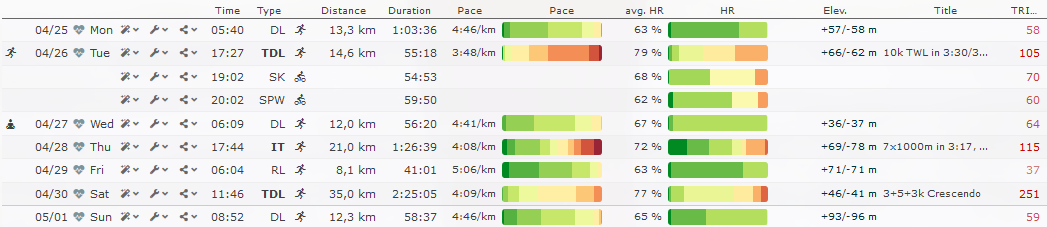
Color bars for intensity by zone distribution
Runalyze now offers a possibility to directly assess the intensity of an activity in the calendar view at a glance: Color bars for zone distribution.
Removed Polar history import
Due a change on Polar's site we are not able to offer the Polar history import anymore.
New lap intensities besides active/rest
We've added further lap intensity options. Laps can now be marked as 'Interval/Active', 'Recovery', 'Warm-up', 'Cool-down' and 'Rest'.
FIT details: trimp added
Runalyze is now able to import vendor-specific trimp values stored in *.fit files.
Changes regarding defaults after registration
We changed some defaults after registration. We removed the activity type for 'Warm-up' (which motivated people to split workouts into three activities), renamed 'Jogging' to 'Eas run' and 'Long Slow Distance' to 'Long Run' and removed default clothes. Nevertheless, this does only apply for upcoming registrations and as usual every user can define his own activity types and equipment categories (and rename the existing ones).
Duplicate detection improved
We have improved the duplicate detection during activity import.
Detection of Zwift locations
Missing data in Zone distribution/Poster Tool/Performance Curves
It took a while until we have found why some data is missing. This has been fixed now and some activities are reprocessing. You should see all data until tomorrow evening.
Feature voting platform
Internally we already track all your feature requests and try to see what we develop next. Now we've just added a Feature Voting Plattform, where you can submit feature requests, upvote existing requests and also get notified when there is a new status of your request.
Performance curves for last 90 days
The performance curves have been added for individual activities some time ago. We now have the performance curves for last 90 days live. You can find them in the list of tools or directly at https://runalyze.com/my/performance-curves.
Zone distribution based on raw data is now available for everyone
Zone statistics (for pace/power/hr in the statistics tab) based on recorded data series are now available for everyone. These statistics were based until now only on the average values of the activities.
Health section: Blood Glucose tracking
Sync with Oura (Beta)
Synchronization with Oura (http://ouraring.com/) is now possible. So far only sleep data, as we do not yet support HRV data outside of individual activities. In the same move, we added two more data fields to the sleep data (average heart rate and resting rate
Beta: Zone distribution based on raw data
Zone statistics* (Pace/Power/HR) based on recorded data series are now available for Runalyze Supporter as beta feature. These statistics were based until now only on the average values of the activities.
*Only at the Analysis-Statistic plugin yet
Sync with Wahoo
You are now able to sync our activities from Wahoo to Runalyze automatically. Read more
Suunto - Upload fit file to Suunto App
If you have a connected Suunto account at Runalyze you can now upload a Fit file directly to Suunto app.
Search for virtual activities
Virtual activities (e.g. Zwift rides/runs) can now be filtered when searching for activities.
Glossary: Climb Score and Percentage hilly
We have added glossary entries for Climb Score and Percentage hilly.
Aerobic threshold estimation based on HRV
Runalyze has a new experimental feature: for activities with HRV data (or RR intervals) the aerobic threshold can be estimated (or at least it’s tried to do so).
Read more in our latest blog article.
Performance curves for single activities
With the latest update, Runalyze can now display power, pace and heart rate performance graphs for individual activities. These graphs show the best or maximum performance for all possible time periods – from one second to the entire activity duration.
Read more in our latest blog article.
Fixes for week numbers at turn of the year
At some places week numbers at turn of the year were not correctly taken into account.
Polar Sleep Sync activated for everyone
Power duration curves for last 90 days are now in private beta
We are currently testing new features based on the long-term trend of histograms, duration curves, and route data. This includes power duration curves, which are now available for the first beta testers.
FIT details are now available in miscellaneous section
FIT details (performance condition, recovery time, estimated VO2max by file, ...) are now available in the miscellaneous section of the activity view. They have been visible in the dataset only so far.
Suunto route upload
If you have a connected Suunto account at Runalyze you can now upload a GPX route directly to Suunto app and thus to your watch.
Fix initial trimp calculation
Since 1st December, the initial trimp calculation may have been off. This has been fixed now.
Poster generation: option to generate heatmap for a single month
There's a new feature (for supporters only): The poster tool has a new option to generate the heatmap (or grid layout) for a single month.
Weather data: request data for the middle of the activity
Up to now the weather data was always queried for the beginning of the activity. This has now changed and we now request the weather at the middle of the activity.
New configuration option: import lap times with tenths of a second
We have added a new configuration option Round laps to full seconds which defaults to true. Unchecking this option will give you lap times with tenths of a second for future imports.
Running Effectiveness and Relative Running Economy in dataset & tools
- Respect date related weight, maximum/resting heart rate in tools and dataset
- Add Running Effectiveness to tools
- Add Relative Running Economy to dataset and tools
Fix gpx parser to respect detect pauses settings
Withings token refresh failed
A third party library we were using used some old invalid urls to request tokens. This has been fixed. If you have problems with the Withings connection please disconnect and reconnect.
Initial deploy of Personal API
Read more in our help article or start by generating your own token in your account.
API Health metrics: bulk endpoint
Our API got an bulk endpoint for health metrics.
Fix for (rare) disappearance of single data
Our "PrivacyGuard" had a bug which caused the graphs/raw data to be missing for some activities. If you are affected by such an activity, you have to import this activity again.
Extended our API (Health metrics)
We have extended our API for our partners.
Respect all privacy settings from dataset for shared activities
Two months ago we started respecting the 'main' privacy settings from your dataset. Now, almost all privacy settings are respected. For example, if you set your average heart rate to private, the heart rate data series for other people will also be hidden.
New metric: VAM
VAM is the average ascent speed in meters per hour, calculated based on all classified climbs in Runalyze. This value is now available for all upcoming activities (with at least one classified climb).
Shortcuts to set all activities public/private
You can now set all your activities public or private with one click from your privacy settings.
Fix gradient calculation in case of bad gps data
Activity view: plot for flight time
The activity view now includes a plot for flight time (assuming cadence and ground contact time are available).
ANOVA: group by month (and year), weekday and daytime
Our ANOVA tool can now group values additionally by month (and year), weekday and daytime.
Internal version upgrades
We have upgraded several internal dependencies of Runalyze.
Polar Health Sync
Due to a bug no weight or rest heart rate data was received. This should work again for future entries.
Option to switch off power calculation
Runalyze can automatically calculate power for running and cycling activities. Previously, this was always done when no recorded data was available. From now on you can choose for each sport whether Runalyze should calculate power always, never or only when empty.
Option to limit Polar Sync
Runalyze now has same settings for limiting Polar Sync as for Garmin Sync. Still, sleep sync is not yet available for Polar due to problems on Polar's side
Fix aerobic decoupling calculation
Fix trimp calculation in case of partially missing heart rate values
Option to limit Garmin Sync
As some users have requested we have now created a setting to restrict the Garmin synchronization.
Select whether you want to have the resting heart rate, sleep data and/or body composition automatically synchronized. Default remains "yes"
Withings Sync is now available for all users
Fix pace in race prediction calculator
Fix activity form: calculate kcal only if distance changes
Fix disconnecting accounts from Garmin/Suunto/Withings
In rare cases an invalid connection to these services resulted in problems disconnecting those accounts. This has been fixed.
Date, time and number format
You can now set your locale dependent date, time and number format in your account settings.
Color route according to speed
Garmin beat us to it a few days ago, but this feature has also been on our wish list for a long time. Now it’s done and you can also colorize all your tracks by speed in Runalyze. So you can see directly on which sections you were especially fast or slow.
Read more at our blog.
Fix time zone issue for posters
Some activities were assigned to the wrong day within the poster tool.
Start of the week: new option "Saturday"
Fix gap calculation for extreme gradients
Gradients above 40% (or below -40%) were incorrectly evaluated when calculating the Grade Adjusted Pace.
Device detection: Updated list of devices and vendors
We have updated our device list and are now able to detect a lot of new devices and vendors.
New beta feature: Withing Sync
Synchronization of health data from Withings is now enabled for Runalyze Supporters.
Garmin History Import: Limitation removed & history health sync added
The Garmin history import can now be used again without any limitation by Garmin. Requesting more than 1000 days of history is possible again.
Body composition, sleep data and resting heart rate are now available for syncing too. Duplicates can occur for health data if entries already exist for requested time period.
Recovery heart rate in activity view
The recovery heart rate (2 minutes after stopping) had been available as dataset value and is now shown in the activity view as well.
Edit activity: 'Save and close' button
Relative TRIMP has been added to dataset and ANOVA and trend analysis
Relative TRIMP is simply TRIMP per hour. It can be used as an intensity metric, similar to average heart rate, but taking into account the changing workloads during the activity.
Respect privacy settings for shared activities
The 'main' privacy settings from your dataset are now respected for your shared activities (daytime, title, notes, route name, training partners, tags and equipment). You may want to set those fields to private in your dataset settings.
FIT files: Fix for files from FORM smart swim goggles
Polar Sync: Resting heart rate and weight
Resting heart rate and weight should now also be automatically synchronized from Polar to Runalyze. Sleep data cannot yet be synchronized due to a problem with Polar.
Garmin Sync: Duplicates with weight and resting heart rate
Due to a misunderstanding of sleep and resting heart rate synchronization with Garmin, there were many duplicates. A fix was applied. Most duplicates for Resting Heart Rate and sleeps have been removed.
Full tables for all health data
All kind of health data like weight, sleep, mental state, blood pressure, maxium heart rate and resting heart rate have their own tables now where you can edit and delete all entries.
Garmin History Import is back again (with limitation)
The Garmin history import is available again. But as we are limited temporarily by Garmin with 1000 days/minute the tool maybe shows an information that you need to wait a minute.
Sync for Garmin weight, sleep and resting heart rate.
Weight and sleep data is now synced automatically from Garmin to Runalyze. Resting heart rate should be synced automatically too.
Refactored health section
New health section: We have migrated all data to the new health section.
A blog post with all changes will be available in the end of the next week.
Track mental state
Mood, fatigue and stress can have quite an impact on everyday training. Both positive and negative. Looking at these values over a longer period of time is therefore not only important for training, but also to be able to counteract in everyday life if the fatigue and stress continues for too long.
Track blood pressure
You can track your blood pressure. Automatic sync with e.g. Withings is in work
FIT files: Update for internal fit parser module
New Metrics: GAP, xGAP, xPace, Variability Index, Aerobic Efficiency, Aerobic Decoupling and Uphill/Downhill Efficiency
We will explain to you in detail what the values mean in detail soon. But you can already find the values for all future (!) activities in the activity view, in the dataset (must be activated) and in the usual tools (trend analysis, ANOVA, sorting by search). - And you can find a short info about the values in our glossary.
We know that you would like to see the values for all past activities - so would we. But this requires the re-processing of many millions of activities. We have this on our radar and will let you know as soon as this is possible or available.
Rebuild of database infrastructure
We have rebuilt, updated and extended our database infrastructure.
Grade adjusted pace for running
After a long time in beta status, the Grade Adjusted Pace (GAP) is finally here. We have made some adjustments to the calculation parameters and from now on we will show you the GAP for the running activities, for single laps and for climbs.
Facebook Login fixed
Streak view shows total distance
We have added the total distance to the shown streak (statistics 'plugin' below calendar view).
Equipment table: last use
The full equipment table has a new column for the last use of each object.
Show climbs in activity view and dataset
Climbs are now available in the activity view. In addition, you can activate the number of climbs (and their categories) in your dataset for the calendar view.
Fix weather mapping
Some weather conditions were wrongly assigned for data of the service provider darksky with us.
Progression Graph
From now on you can view the progress chart for the different sports and time periods on Runalyze.
Compare your distance, duration, ascending altitude, TRIMP or number of activities in the current period (year/month/week) with a previous one (up to the beginning of last year at the most), and keep track of where you will end up.
Fix reading developer fields for multisession files
Fix gps parser for non-defined namespace extensions
Support for data series developer fields from FIT files
Runalyze does now import and store all developer fields from FIT files. Read more at our blog.
Fix default privacy for all sports
Due to a bug in the new account setup guide we had to reset the privacy settings for all users in the sports to private. If you want to have the activities automatically set to public when importing, you have to reconfigure that setting for each sport.
Easy account setup
Athletes can now easily set up their account to provide all the data necessary for specific calculations. Read more at our blog.
Fix best sub segments for non-equidistant data
There was a bug resulting in wrong best sub segments for power data in case of non-equidistant data. This behavior has been fixed.
Fix false duplicates for short transitions
Multisport sessions (e.g. Triathlon) with short transitions (less than one minute) led to false duplicates.
Fix time zone issue for sports panel
The sports panel did ignore the user's time zone when showing e.g. current week.
Out of beta: improved views for marathon shape and running performance status
Our two new views for the current marathon shape and for the running performance status are now available for all users. Read more on marathon shape view and running performance status at our blog.
Fix imperial units in plot tooltip
Plot tooltips in activity view did not respect imperial units.
Option to recalculate a single activity
It is now possible to recalculate TRIMP, VO2max and altitude for an individual activity.
Activity view: dynamically show inactive laps
History import for Decathlon
You can now take over your complete history via Decathlon sync.
Support for treadmill incline from Runn sensor
We have added support for incline data from Runn™ Smart Treadmill Sensor from North Pole Engineering.
New beta features: improved views for marathon shape and running performance status
For users with supporter status there are two new views for the current marathon shape and for the running performance status. We explain the new Marathon Shape View in detail on our blog and an article on the running performance status view will follow. After a few weeks those features will be freely available for every user.
Various minor improvements for activity view
We have internally refactored the activity view (to get rid of some legacy code) and added a few improvements. Heart rate and pace zone tables as well as computed laps do now show average power and power zone table does now show average pace.
Fix Google login for some users
The Google login did not work for everyone lately. We have fixed the issue by updating a third-party library.
Decathlon: automatic synchronization
Direct synchronization with Decathlon & Domyos E-Connected is now possible. Read more at our blog.
Glossary: running dynamics
We have added various new entries in our glossary for running dynamics (cadence, stride length, ground contact time/balance, vertical oscillation/ratio, flight time/ratio).
Climb score: show avg. power
Average power was added to the Climb Score view. You can switch between pace and power now.
Increased max length of equipment notes
NEW: Become a RUNALYZE SUPPORTER
To be able to invest more time in RUNALYZE in the long term, we are now launching a subscription model. You can become a RUNALYZE supporter. Read more at our blog.
Special event: Easter Run 2020
In view of the current situation and numerous cancelled events, we have organised a virtual Easter run. Read more at our blog.
Fix map for poster tool
Coros added export to RUNALYZE
Read more at our blog.
Internal refactoring for account activation/deletion and password recovery
TCX export of activities without datapoints
Revert using fit files for Polar sync
Polar sync now uses *.fit-files by default
Polar sync now uses *.fit-files by default. The option to switch formats has been removed.
New elevation correction config option
The user can switch between "Never correct", "Only if device has no barometer" or "Always". The new option "Always" is intended for cases when the barometer of a device is broken or provides useless data.
Do not correct elevation for devices with barometer
If a device that has a barometer is detected during import, no automatic altitude correction is performed, even if it is activated in the configuration. Barometric altitude data is usually much more accurate than data corrected by satellite data. A manual correction is still possible afterwards.
Fix altitude data from barometer
Elevation data from a device with a barometer was erroneously stored as 'corrected' data. Affected are activities between 13 and 17 March. In this case the data was not corrected, only the displayed message is incorrect.
Glossary: rest days and calculated power
Due to some recurring questions, we have added new glossary entries for rest days and calculated power.
Automatic device detection
When importing fit files, the device is now automatically detected in almost all cases.
Suunto: Force sync of individual activities
Sometimes Suunto only informs us with a significant time delay if a new activity is available. If in doubt, you can now directly trigger a sync of individual activities.
Fix invalid vo2max correction factors
In rare cases an invalid vo2max correction factor was calculated.
Fix generation of social images
After a recent change the generation of the images did not work anymore.
Anova and trend analysis: total strokes and swolf
We have added the swim metrics total strokes and SWOLF to our anova and trend analysis tools.
Fix account deletion link
The link to delete the account in the account settings was temporarily not available.
Limit number of zones
We have limited the maximum number of zones you can set per metric (heart rate, pace, power) to 20.
Add range for easy trimp
Instead of a single value (to reach TSB = 0) 'Easy TRIMP' now shows a range to keep an optimal workload ratio of 0.8 < A:C < 1.3.
Fix anova tool
The anova tool wasn't available after our latest internal framework update.
Internal framework update
We have updated the framework we use internally.
Fix menu on mobile devices (logout link was not reachable)
Running Effectiveness: clearify 'levels'
The levels we have shown so far for Running Effectiveness are only valid for data coming from Stryd. Running Effectiveness based on calculated power data (as done by us via GOVSS) do not have a high information content.
Fix power calculation for files with only zeros in power stream
Power values have not been calculated if the imported file contained only zeros. This behavior has been fixed now.
Fixed Polar History Import tool
Due to another uncommunicated change on Polar's side our history import for your Polar data did not work correctly.
Gravatar as profile image (optional)
You now have the option to use the gravatar as profile image (shown in the upper right corner of the dashboard and your public athlete page).
Race performance chart: date on x-axis
The Race Performance Chart has a new option to use the date as x-axis.
FIT files: support for Anaerobic Training Effect
Fix adding race result for activities with very long titles
Mapzen is the new default service for elevation correction
The elevation data from Mapzen has been set as the default elevation service. The service uses the terrain tiles dataset from AWS' open data registry.
User Backup creation failed
Backups were not working since 4th December. This has been fixed now.
Disabled Runtastic converter
Runtastic's official backup does include gpx files with heart rate and altimeter information from now on. The converter is not required anymore and has been disabled.
Ascent/Descent instead of a single elevation value
Ascent and descent can now be edited and can be entered for activities without elevation profile. So far, most sections used only a single elevation value (which was the maximum of ascent/descent). From now on, a single elevation value always shows the ascent.
New power value: xPower
xPower is a weighted average of your power output and serves as an alternative stress metric.
Read more in our glossary.
FIT files: support for description field by Suunto
From now on the developer field "description" Suunto uses in FIT files is mapped to our description field in RUNALYZE.
Fix for imports of invalid power data
Invalid power values (e.g. negative values) are now ignored when parsing a file. We discovered some tcx files that failed while importing because of those invalid values.
Export of a single activity: use correct laps
Exported activities (e.g. as tcx file) will now contain the correct laps instead of default 1k auto-lap.
Acute:Chronic workload ratio in calculations panel
The Acute:Chronic workload ratio (ACWR), which is simply the ratio of ATL and CTL, is now shown in the calculations panel. It can be used to determine injury risk.
Read more in our glossary.
RSS Feed for this changelog
You can now also subscribe to the changelog as an RSS feed.
Fix for poincaré plots
Until now, poincaré plots of hrv data always displayed only one (the last) y-value for an x-value. This behavior has now been fixed.
FIT files: support for estimated vo2max by Suunto
From now on the estimated vo2max by Suunto is mapped to our internal "estimated vo2max field" from fit files. You can activate this value in your dataset.
Performance bug
We have fixed a configuration that resulted in slower page calls.
Various bugfixes and improvements in our activity importer
Fix 'remember me' for login
The "remember me" functionality has not worked correctly since our recent redesign. This bug has now been fixed so that users can stay logged in for a longer period of time.
Automatic time zone detection for file imports
The time zone detection, based on the activity's coordinates, was broken for some time. During that time, we only used the user's default time zone which may be incorrect in case of e.g. vacations.
Auto-fill route names with start location
The start location is now automatically added to the "Route" field if the activity contains gps coordinates.
New design for landing page, login, registration, ...
We have redesigned the publicly accessible pages such as the landing page, login and registration or our glossary and help pages.
Calculated power is now correctly updated when the sport or altitude profile is changed
For all running and cycling activities for which no recorded power is available, power is automatically calculated. This calculation is now correctly performed (or removed) even if the sport is changed later and updated if the elevation profile is changed (by elevation correction or removing a data series).
Suunto Sync: Fixing laps
When syncing Suunto activities there were problems with the laps. We only support flat laps. This if fixed for all future activities.
TCX files: Fix empty altitude values
Missing altitude values were wrongly imported as "0", which leads to different problems. These values are now imported correctly as unknown.
Power calculation for running: Fix for potentially negative values
Illegally high speeds (e.g. due to errors in data recording) may have led to negative power values. This behavior is now suppressed.
Automatic translation of help articles
Help articles will be automatically translated into German, French, Spanish, Portuguese, Dutch, Italian, Polish or Russian if we have not translated them yet manually.
Activity data: New data series for Air Power from Stryd
Air Power data streams by Stryd will be imported for all upcoming activities. Still, we don't show the data in the activity view yet.
Storing original FIT files
From now on we are storing all uploaded fit files. You can download them from every individual activity.
Show/Add equipment categories in sport settings
In the sports configuration, the individual equipment categories of a sport can now be viewed, assigned and removed.
GOVSS/Running power for everyone
The automatic estimation of power data, if no recorded data is available, was previously only available for cycling. We now have such an estimate for running activities as well.
Read more in our blog post Running Power for everyone.
Workaround for activity upload from mobile devices
Mobile browsers like Safari do not support the list of supported file extensions. We added a temporary workaround until all mobile browsers fix that issue.
Fix stats view for some rare cases
Fix table headers in statistics plugin for year on year view
Added a changelog
We work on RUNALYZE day in and day out. To give you a better idea of all the changes, bugfixes and new features we're releasing, we've added a public changelog.
Centralized logging for the growing infrastructure
Fix trimp calculation after removing heart rate series
Fix for calculated training paces
The calculation of the paces in the section "Training paces" contained a small error. Speeds below 100% were a bit too fast, above 100% a bit too slow.
Design: Adjust colors to match logo
Fix fit parser for swimming heart rate in multisport files
Problem was caused by swimming heart rate, which is at the end of the file but belongs to the second session.
Show dataset labels in statistics
Elevation calculation: Correctly respect pauses
Tracked pauses must cause elevation calculation to split trackdata into different segments and add ascent/descent values of all segments separately to total ascent/descent.
Single queue for activity import
As a preparation for scaling the activity import, activities from history import, API import and normal sync now end up in the same queue.
New service for elevation data: Mapzen
We are evaluating new data sources for elevation data and added Mapzen as a new elevation service. The service uses the terrain tiles dataset from AWS' open data registry.
Sport type can be guessed by title
Activity titles (as provided in some file types) will be used to guess the user's correct sport type.
New tool: Convert Runtastic backup to gpx files
Runtastic has decided to discontinue its web platform. Downloading all your data from Runtastic is easy, but the data is stored in a non-usual format. We made a converter written by Glenn Reyes available to let you get your activity files in a standard gpx format. You can find our converter at runalyze.com/runtastic-converter.
Fix social image download
Internal framework update
We have updated the framework we use internally by some versions.
Refresh Suunto API Tokens automatically
Fitbit sync: Ignore duplicate notifications
Garmin sync: Check content type
Garmin's new API provides information about the file type. Unfortunately, for older activities, this is always mistakenly FIT, whether or not the file type is actually GPX. Garmin knows the bug but will not fix it. We now check the file content so that the import works accordingly.
Single fields for ascent/descent in tools and dataset
FIT files: Recovery heart rate 2 Minutes after end of activity
Removed dataset style option
Remove old Garmin api
The outdated Garmin api has been removed. Users that have not switched to the new api will not have any activities synchronized until they have connected to the new api.
FIT files: Update for internal fit parser module
Fix multisession files from Suunto
Activity data: Added Peak EPOC and support for recovery time from Suunto
Activity data: New data series for Respiratory Rate from Garmin devices
FIT files: Support for Power by IQ app Running Power Estimator
Power by Garmin Connect IQ app Running Power Estimator does not use the standard power field to store power data. This is now mapped to the power field in Runalyze.
Full Garmin import via new api
We are now able to provide a full history import (except third party activities and manual activities) from Garmin.
Subjective feeling in activity
Gradient distribution in climb score
Polar Sync: Option to choose between fit and tcx format
Fix social images to correctly respect pauses
Adjust tile url for hikebikemap
Stride length available in anova and trend analysis
New uploader: Zip is extracted in browser
Fix wind chill to ignore temperatures above 10°C
Fix climb score view for imperial units
Improved fitlog import
Fix reading gpx extension values (ns1)
Fix Suunto API deauthorization
Full Suunto import (with range option)
Improved requeuing of activity sync and import
Shape plot: New option 'Last 24 months'
Fix dashboard for users without active statistic plugins
New Help and Support section
We have introduced a new Help and Support section at runalyze.com/help trying to answer the most frequent questions.
Update Facebook share feature
FIT files: Fix idle laps in swim files
Emoji support for various comment fields
Strava history import
A strava history import tool is now available. We still recommend to use the Strava Bulk Export option, as it contain the original fit files which were uploaded to Strava.
https://runalyze.com/help/article/strava
 Follow us